

Email Setup
These instructions will help with your initial account setup and signing in to email on your devices. If you need any assistance or are unable to sign into your accounts, please reach out to someone from our IT team.
The domain for your IHMC email account is first initial + last name@ihmc.org. If you previously had an email account with an @ihmc.us domain, emails sent to that address will still be received at your @ihmc.org email account.
The password for this account will be the same as other services utilizing Active Directory such as the VPN, Gitlab, etc.
Instructions for initial login and MFA setup
-
Go to outlook.office.com
-
Log in with your @ihmc.org email address.
-
A “More information required” message will appear. Click Next.
-
Microsoft 365 uses Multi-Factor Authentication (MFA). There are multiple options: Microsoft Authenticator (app), 1Password, Phone, or Email. To select another option than Microsoft Authenticator, click either “I want to use a different authenticator app” (1Password) or “I want to set up a different method” (Phone or Email).
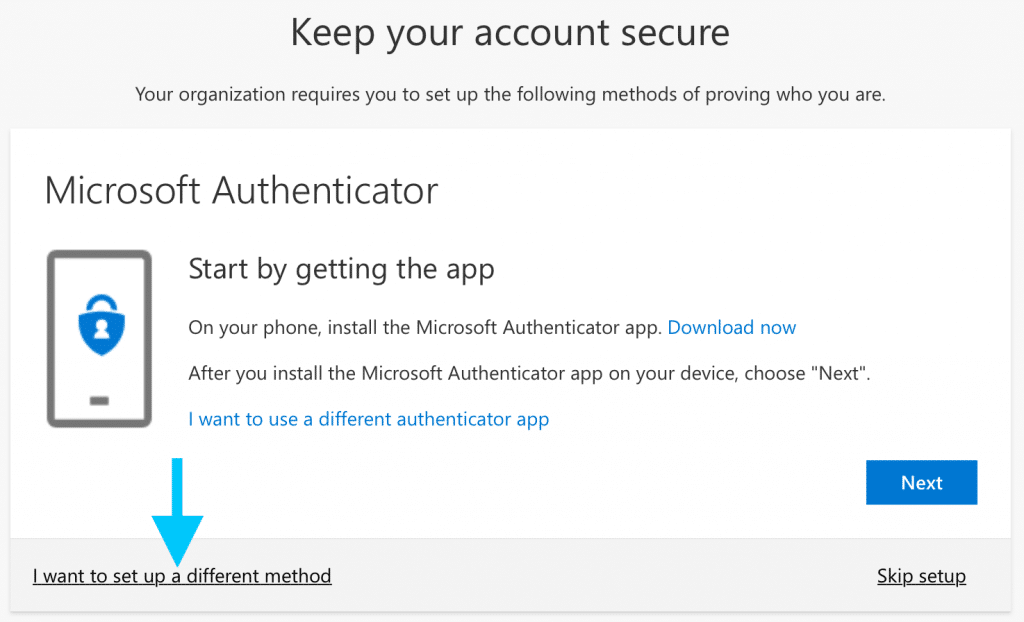
-
Once you have set up MFA, you can proceed to your account.
-
Follow these instructions to change your password from the initial password given to you.